White-label SEO audit checklist: what a client-ready audit should cover
SEOReseller guide · Publishes · 3 min read
Short answer
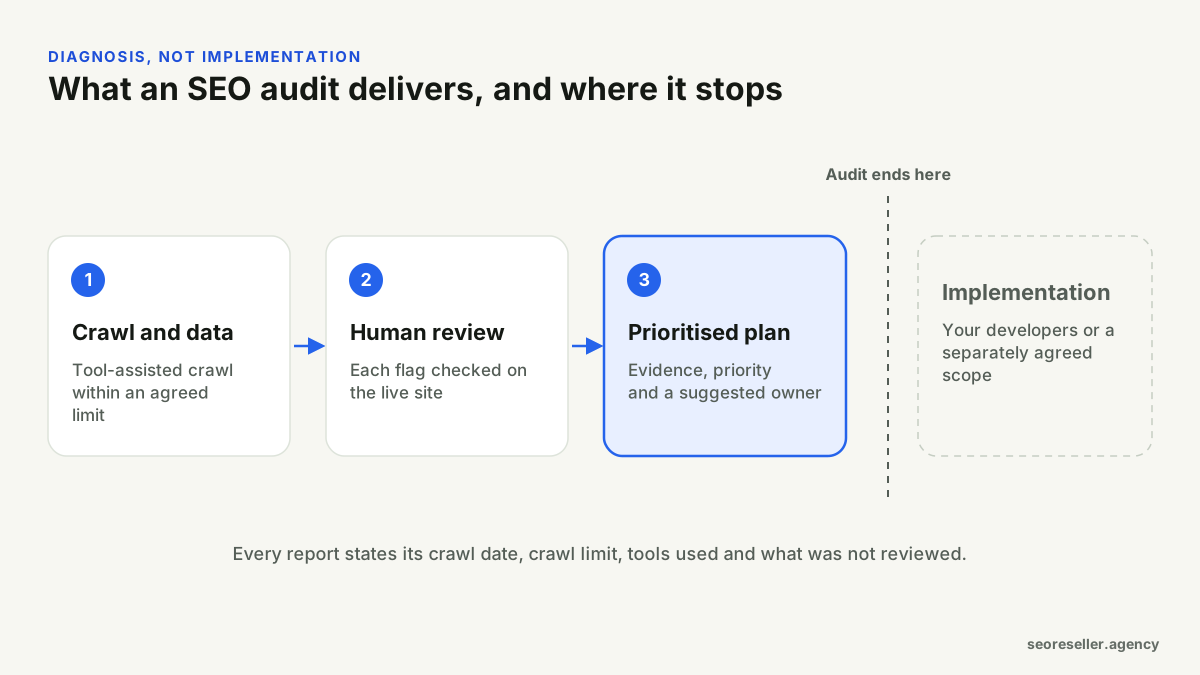
A client-ready SEO audit covers crawlability and indexing, site architecture and internal links, on-page elements by template, structured data and page experience, and states its own limits: crawl date, crawl size, tools used and what wasn't reviewed. Every finding needs evidence, a priority based on that site's situation, a recommended fix and a suggested owner. An audit is a diagnosis; implementation is a separate decision.
Key takeaways
- A tool export is evidence, not an audit. A person must confirm each flag on the live site.
- Review by page template, so one fix covers many pages.
- Prioritise by impact on this site, not a generic severity score.
- Every audit should state its limits: crawl size, date, tools and exclusions.
An audit is not a tool export
Crawlers and SEO platforms produce long lists of warnings, many of which don't matter for a particular site. An audit adds judgement: each flag is checked on the live site, false positives are removed, and what's left is ranked by how much it matters here. If a "white-label audit" is a rebranded export with no review, the client pays for noise.
Agree the scope first
- Which domain and sections are included, and which aren't (account areas, checkout, staging).
- The crawl limit, in URLs, and how page templates will be sampled.
- Whether Search Console or analytics access is available.
- Known history: migrations, redesigns, platform changes and their dates.
- Whether a backlink review or content review is included.
What the audit should check
Crawling and indexing
- robots.txt rules and anything blocking important sections.
- noindex directives, and whether they're intended.
- XML sitemaps: present, submitted, and listing canonical, indexable URLs only.
- Status codes: broken pages, redirect chains, soft 404s.
- Canonical tags: present, self-referencing where expected, not conflicting with redirects or noindex.
- Indexing coverage in Search Console, if access was given.
Architecture and internal links
- Important pages reachable within a few clicks.
- Orphan pages with no internal links.
- Internal links pointing at redirected or broken URLs, which is common after migrations.
- Duplicate paths, parameters and faceted navigation creating near-identical pages.
On-page, by template
- Title and meta description patterns per template.
- Heading structure and whether the main topic is clear.
- Thin or duplicated template content.
- Image alt text where images carry meaning.
Structured data and page experience
- Structured data valid and true to the visible page.
- Core Web Vitals (Largest Contentful Paint, Interaction to Next Paint, Cumulative Layout Shift), using field data where available.
- Mobile usability and accessibility basics that affect users.
How each finding should be written
| Field | What good looks like |
|---|---|
| Issue | One plain sentence: what's wrong |
| Evidence | Affected URL sample, screenshot or tool output, with a date |
| Priority | High, medium or low for this site, with a reason |
| Recommended fix | Specific enough for a developer or writer to act on |
| Suggested owner | Developer, content or SEO |
You can see this format in our sample audit action plan.
Limits every audit should state
Crawl date, crawl limit reached or not, tools used, sections excluded and whether Search Console data was available. Stating limits isn't a weakness; it tells the client exactly how much weight to put on the findings.
Audit quality checklist
- Scope, crawl limit and exclusions agreed in writing
- Every finding confirmed on the live site
- Evidence and a date for each finding
- Priorities explained for this specific site
- Fixes assigned to a suggested owner
- Limits stated at the top of the report
Platform matters too. See the platform checklists for WordPress and Shopify, and how we scope white-label SEO audits.