
Skip to content
SEOReseller

Platform audit checklist

WordPress SEO audit checklist for agencies

What to check when you audit, launch or take over a WordPress site, and the platform-specific problems that come up most.

audit areas
4
individual checks
13
common problems, with fixes
3
launch-day checks
4

Short answer

Auditing a WordPress site means checking the platform's own settings and everything plugins add on top. Start with the "Discourage search engines" setting, which is often left on after launch, then check for duplicate sitemaps from core and SEO plugins, thin tag, author and date archives, attachment pages, conflicting SEO plugins, permalink changes without redirects, and performance problems caused by page builders and scripts.

Platform details reviewed October 30, 2026. WordPress changes its settings and menus regularly, so confirm specifics in its current documentation before acting.

What's different about SEO on WordPress

  • Almost everything depends on the theme and plugins, so two WordPress sites can behave completely differently.
  • Core WordPress generates its own XML sitemap, and SEO plugins usually replace it with theirs, so it's easy to end up submitting the wrong one.
  • Archives for tags, categories, authors and dates are created automatically and can produce many thin pages.
  • Staging copies are common and are sometimes left publicly crawlable on a subdomain.

The WordPress audit checklist

Visibility and indexing

  • Settings → Reading: "Discourage search engines from indexing this site" is unticked on the live site.
  • Only one sitemap index is submitted in Search Console, and it lists canonical, indexable URLs.
  • Tag, author and date archives are either useful or kept out of the index.
  • Attachment pages redirect to the file or parent post rather than standing as thin pages.

Plugins and conflicts

  • Only one SEO plugin outputs titles, meta descriptions, canonicals and structured data.
  • Inactive or abandoned plugins are removed, not just deactivated.
  • Redirect rules live in one place: a plugin, the server or the host, not several at once.

URLs and redirects

  • Permalinks use readable post-name style URLs rather than ?p= query strings.
  • Any past permalink change has redirects from old URLs to new ones.
  • HTTP to HTTPS and www or non-www versions redirect to a single preferred host.

Performance

  • Page builder output, sliders and unused scripts aren't slowing key templates.
  • Images are compressed and sized for their display width.
  • Caching is configured and doesn't serve logged-in or outdated content to visitors.

Common WordPress problems and fixes

Site launched with search engines discouraged

Why it matters
The setting used during development adds a noindex directive, so the live site can drop out of search.
Fix
Untick it in Settings → Reading, confirm the robots meta tag is gone, then request indexing for key pages.
Two SEO plugins active

Why it matters
Both may print titles, canonicals and structured data, producing duplicates or conflicting signals.
Fix
Choose one plugin, migrate its settings, and remove the other completely.

Staging site indexed

Why it matters
A crawlable staging copy duplicates the live site and can expose unfinished pages.
Fix
Protect staging with password authentication at the host level, then remove indexed staging URLs.
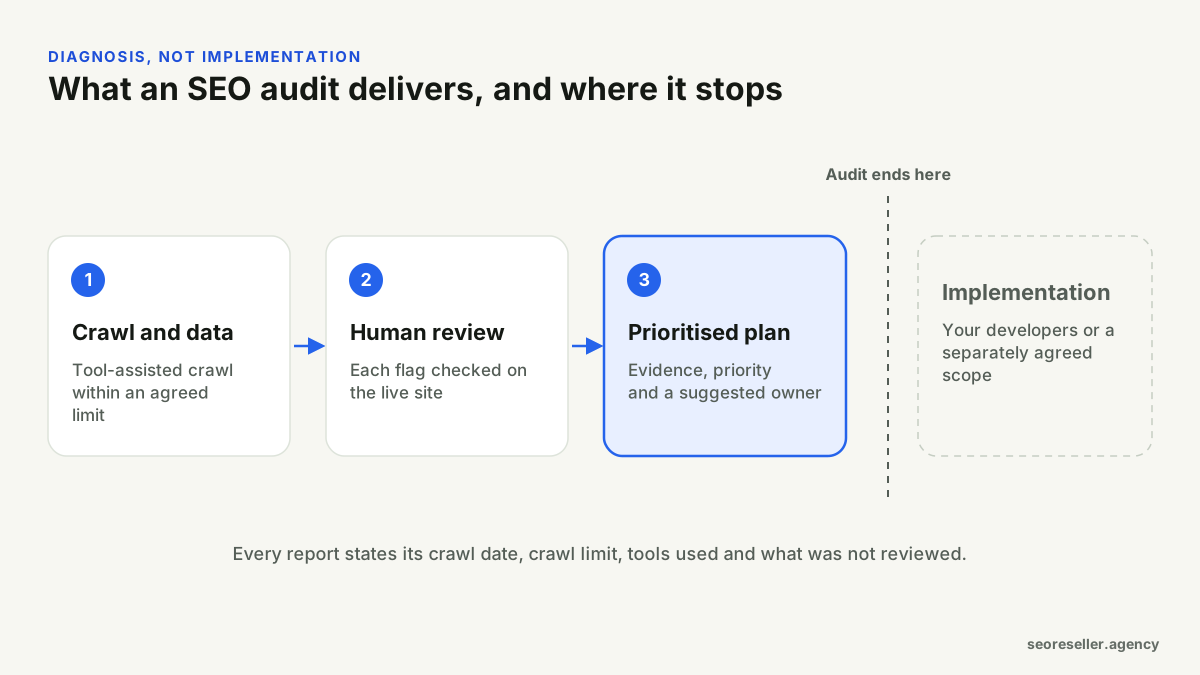
Diagram of an SEO audit: crawl and data, human review and a prioritised plan, with implementation shown separately as its own scope.
An audit is diagnosis. Implementation is a separate decision.

Launch-day checks for WordPress

  1. Search engine visibility setting checked on the live domain.
  2. Correct sitemap submitted and the old one removed from Search Console.
  3. Redirect map tested for pages that moved from the old site.
  4. Staging environment password-protected.

Frequently asked questions

Which WordPress SEO plugin is best?
Several well-maintained plugins do the job. What matters more is using exactly one, configuring it deliberately and not letting it overlap with theme or other plugin features.
Should WordPress tag pages be indexed?
Only if they're genuinely useful collections with enough content. Many sites have hundreds of tags with one or two posts each; those are usually better kept out of the index or consolidated.

Need a WordPress site audited?

Send the site, the sections to include and any recent changes. You'll get a written scope and quote before any work starts.

  • You keep the client relationship
  • Unbranded deliverables
  • Written scope before work starts